
Download WriteDoc.ai – AI‑Powered Document Creation Tool
Overview
WriteDoc.ai is a web‑based AI writing assistant that transforms the way you create documents. Built on advanced natural‑language algorithms, the platform helps businesses, researchers, and students generate polished, professional content in a fraction of the time it normally takes. Because it runs entirely in the browser, there’s no need to install bulky software on your PC or laptop.
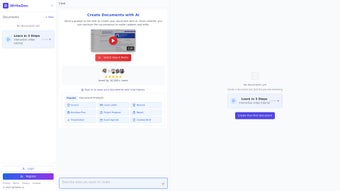
Users simply log in, describe the type of document they need, and watch WriteDoc.ai draft a complete, well‑structured piece—from research reports and marketing copy to academic essays and business proposals. The interface is clean and intuitive, allowing even non‑technical users to navigate the tool with ease. Smart suggestions appear in real time, helping you fine‑tune tone, style, and layout without the endless back‑and‑forth of manual editing.
WriteDoc.ai also optimizes formatting automatically, ensuring that headings, bullet points, tables, and citations follow industry‑standard conventions. Whether you’re drafting a quick email or a multi‑page whitepaper, WriteDoc.ai delivers high‑quality output that feels like it was written by a seasoned professional.
Key Features & Benefits
- AI‑Driven Content Generation: Input a brief description, and the engine produces a full‑length draft that matches your desired tone and audience.
- Smart Layout Optimization: Automatic formatting of headings, lists, tables, and references to meet corporate or academic standards.
- Real‑Time Suggestions: Contextual tips for improving clarity, grammar, and style as you write.
- Template Library: Access ready‑made templates for reports, proposals, essays, newsletters, and more.
- Collaboration Mode: Share a live editing link with teammates, allowing simultaneous revisions and comments.
- Multi‑Language Support: Generates content in English, Spanish, French, German, and several other languages.
- Secure Cloud Storage: All documents are encrypted in transit and at rest, complying with GDPR and ISO‑27001 standards.
- Version History: Automatic backup of every edit, enabling you to revert to earlier drafts with a single click.
- Export Flexibility: Download finished documents as DOCX, PDF, or plain text for offline use.
- Integration Ready: Connect with Google Drive, Microsoft OneDrive, and popular project‑management tools via API.
Beyond the feature list, WriteDoc.ai delivers tangible benefits that improve productivity. The AI engine reduces research time by surfacing relevant data points and citations instantly. By handling layout and formatting, it eliminates the tedious manual work that often delays document finalization. Collaboration tools keep teams aligned, cutting the email back‑and‑forth that usually accompanies joint projects. Most importantly, the platform’s security guarantees mean you can trust sensitive business information or academic work remains confidential.
Getting Started: Installation, Usage & Compatibility
Because WriteDoc.ai is a fully cloud‑based solution, there is no traditional installation process. All you need is a modern web browser (Chrome, Firefox, Edge, or Safari) and an internet connection. Follow these steps to start creating documents instantly:
- Create an Account: Visit writedoc.ai and sign up with your email address or single‑sign‑on (SSO) using Google or Microsoft credentials.
- Choose a Plan: WriteDoc.ai offers a free tier with limited daily drafts and a paid subscription (starting at $12.99/month) that unlocks unlimited generation, premium templates, and priority support.
- Set Up Your Workspace: After logging in, you’ll land on the dashboard where you can create a new document, select a template, or import an existing file for AI‑assisted enhancement.
- Enter Your Prompt: In the “Start Writing” box, describe the document type, audience, key points, and any specific style guidelines. For example, “Write a 1500‑word market analysis for the renewable energy sector targeting investors, with a formal tone and bullet‑point summary.”
- Review & Refine: The AI produces a draft within seconds. Use the sidebar to accept or reject suggestions, adjust tone sliders, or add custom sections.
- Export or Share: Once satisfied, click “Export” to download the file in your preferred format, or generate a shareable link for collaborators.
Compatibility: Since WriteDoc.ai runs in the browser, it works on Windows 10/11, macOS Catalina and later, Linux distributions with a supported browser, as well as mobile platforms (iOS 15+ and Android 10+) via the responsive web app. No additional plugins or extensions are required, making it an ideal choice for remote teams that switch between laptops, tablets, and desktops throughout the day.
For organizations with strict IT policies, WriteDoc.ai offers a single‑sign‑on (SSO) integration with Azure AD, Okta, and LDAP, ensuring that user management aligns with existing security frameworks. Regular updates are rolled out automatically on the server side, so you always benefit from the latest AI models and feature enhancements without manual patches.
Pros, Cons & Frequently Asked Questions
Pros
- Fast, AI‑generated drafts reduce writing time by up to 70%.
- No software download; works on any device with a browser.
- Built‑in formatting and template library produce professional‑looking documents instantly.
- Robust security and compliance for sensitive business or academic content.
- Collaboration features streamline teamwork across different locations.
Cons
- Free tier limits the number of daily drafts and advanced templates.
- Reliance on internet connectivity; offline use is not currently supported.
- AI may occasionally generate factual inaccuracies, requiring human verification.
- Complex legal or highly technical documents may need extra manual editing.
Frequently Asked Questions
Is WriteDoc.ai suitable for academic writing?
Yes. WriteDoc.ai includes citation assistance, template support for essays, theses, and research papers, and a plagiarism‑check integration. However, users should always verify sources and ensure compliance with their institution’s guidelines.
Can I use WriteDoc.ai on a mobile device?
Absolutely. The platform is fully responsive and works on iOS and Android browsers. All core features, including AI generation and collaboration, are accessible from smartphones and tablets.
How does WriteDoc.ai protect my data?
All data is encrypted in transit (TLS 1.3) and at rest (AES‑256). The service complies with GDPR, ISO‑27001, and offers role‑based access controls for enterprise accounts.
What pricing plans are available?
WriteDoc.ai provides a free tier with limited daily drafts. Paid plans start at $12.99 per month for individuals, $29.99 per month for small teams (up to 5 users), and custom enterprise pricing for larger organizations.
Is there a trial period for the premium features?
Yes. New users receive a 14‑day free trial of the Pro plan, giving full access to unlimited drafts, advanced templates, and priority support.
Overall, WriteDoc.ai stands out as a powerful, user‑friendly AI writing companion that saves time while delivering polished documents. Its cloud‑first approach, strong security, and collaborative tools make it a solid choice for both individuals and teams.
Conclusion & Call to Action
WriteDoc.ai bridges the gap between creativity and efficiency, offering an AI‑driven platform that turns rough ideas into polished documents with minimal effort. Whether you’re a student racing against a deadline, a marketer crafting compelling copy, or an analyst preparing a detailed report, the tool’s intuitive interface, rich template library, and real‑time suggestions empower you to focus on content quality rather than formatting minutiae. With secure cloud storage, cross‑device compatibility, and a flexible pricing model, WriteDoc.ai fits seamlessly into modern workflows.
Ready to experience faster, smarter document creation? Sign up for the free tier today or start your 14‑day premium trial to unlock unlimited drafts, advanced layouts, and priority support. Download your first AI‑generated document in minutes and see how WriteDoc.ai can elevate your productivity.



.png)



